Sessions
VibeOS automatically saves every conversation as a session. Sessions enable conversation resume, cross-session search, and full conversation history management.
How Sessions Work
Every conversation — whether from the CLI, Telegram, Discord, Slack, WhatsApp, Signal, Matrix, Teams, or any other messaging platform — is stored as a session with full message history. Sessions are tracked in:
- SQLite database (
~/.vibeos/state.db) — structured session metadata with FTS5 full-text search, plus full message history
The SQLite database stores:
- Session ID, source platform, user ID
- Session title (unique, human-readable name)
- Model name and configuration
- System prompt snapshot
- Full message history (role, content, tool calls, tool results)
- Token counts (input/output)
- Timestamps (started_at, ended_at)
- Parent session ID (for explicit branches and historical continuation rows)
- Working directory metadata (
cwd, git branch / repo root) when known - Registered project ID when the session has a confirmed project binding
Projects and folders are not session isolation
A session's identity is its session id in SQLite (and, on messaging platforms, the gateway session key that points at that id). The folder or project associated with a chat is metadata and tool context, not a transcript namespace. A confirmed registered project also sets the default boundary for proactive memory recall and session_search; it never merges transcripts or changes a session's identity:
- Desktop / TUI — the Projects sidebar groups chats by saved
cwd/ git root so you can find work by repo. Hover a sidebar row to see the persisted path. Two chats in the same folder remain separate transcripts. - CLI — tools usually start from the process working directory; resume may
chdirto a savedcwd. - Messaging gateway — chats normally use the configured
terminal.cwd; a configured session pin can instead supply a task-local project directory for that conversation. Different conversations always retain different session keys and transcripts.
If a tool command "looks like it came from another project," check the session's stored cwd/project binding and whether the search result reports scope="all". It is never evidence that two transcripts were merged.
Archiving hides a session or project from its normal picker, but keeps its transcript and project-bound history. Explicit recall can still find that work. Deleting a session removes its messages from the local database, so it can no longer be recalled.
The Desktop app keeps a short-lived runtime session id (for live gateway events) and a durable stored session id (the SQLite / URL id). A brand-new chat gets a runtime id immediately; the stored id appears after the first turn is saved. That split is normal — it is not two separate conversations.
What Counts Toward Context
VibeOS stores session history so it can resume conversations, but it does not keep re-sending every byte it has ever handled. On each turn, the model sees the selected system prompt, the current conversation window, and any content VibeOS explicitly injects for that turn.
Media attachments are handled as turn-scoped inputs:
- Images may be attached natively to the next model call, or pre-analyzed into a text description when the active model does not support native vision.
- Audio is transcribed into text when speech-to-text is configured.
- Text documents can have their extracted text included; other document types are usually represented by a saved local path and a short note.
- Attachment paths and extracted/derived text can appear in the transcript, but the raw image, audio, or binary file bytes are not repeatedly copied into future prompts.
For example, if a user sends an image and asks VibeOS to make a meme from it, VibeOS may inspect that image once with vision and run an image-processing script. Future turns do not automatically carry the original JPEG in context. They carry only whatever was written into the conversation, such as the user's request, a short image description, a local cache path, or the final assistant response.
The most common cause of context growth is not the media file itself. It is verbose text: pasted transcripts, full logs, large tool outputs, long diffs, repeated status reports, and detailed proof dumps. Prefer summaries, file paths, focused excerpts, and tool-backed lookups over copying large artifacts into chat.
Use /compress when a session gets long, /new for a fresh thread, and
vibeos sessions prune only when you want to delete old ended sessions from
storage. Compression reduces the active context; it is not a privacy delete.
Pass a name to /new (e.g. /new payments-refactor) to set the new session's
initial title up front — useful for finding it later with /resume <name> or
in the /sessions picker.
Session Sources
Each session is tagged with its source platform:
| Source | Description |
|---|---|
cli | Interactive CLI (vibeos or vibeos chat) |
telegram | Telegram messenger |
discord | Discord server/DM |
slack | Slack workspace |
whatsapp | WhatsApp messenger |
signal | Signal messenger |
matrix | Matrix rooms and DMs |
mattermost | Mattermost channels |
email | Email (IMAP/SMTP) |
sms | SMS via Twilio |
dingtalk | DingTalk messenger |
feishu | Feishu/Lark messenger |
wecom | WeCom (WeChat Work) |
weixin | Weixin (personal WeChat) |
bluebubbles | Apple iMessage via BlueBubbles macOS server |
qqbot | QQ Bot (Tencent QQ) via Official API v2 |
homeassistant | Home Assistant conversation |
webhook | Incoming webhooks |
api-server | API server requests |
acp | ACP editor integration |
cron | Scheduled cron jobs |
batch | Batch processing runs |
CLI Session Resume
Resume previous conversations from the CLI using --continue or --resume:
Continue Last Session
# Resume the most recent CLI session
vibeos --continue
vibeos -c

# Or with the chat subcommand
vibeos chat --continue
vibeos chat -c
This looks up the most recent cli session from the SQLite database and loads its full conversation history.
Resume by Name
If you've given a session a title (see Session Naming below), you can resume it by name:
# Resume a named session
vibeos -c "my project"

# If there are lineage variants (my project, my project #2, my project #3),
# this automatically resumes the most recent one
vibeos -c "my project"   # → resumes "my project #3"
Resume Specific Session
# Resume a specific session by ID
vibeos --resume 20250305_091523_a1b2c3d4
vibeos -r 20250305_091523_a1b2c3d4

# Resume by title
vibeos --resume "refactoring auth"

# Or with the chat subcommand
vibeos chat --resume 20250305_091523_a1b2c3d4
Session IDs are shown when you exit a CLI session, and can be found with vibeos sessions list.
Conversation Recap on Resume
When you resume a session, VibeOS displays a compact recap of the previous conversation in a styled panel before the input prompt:
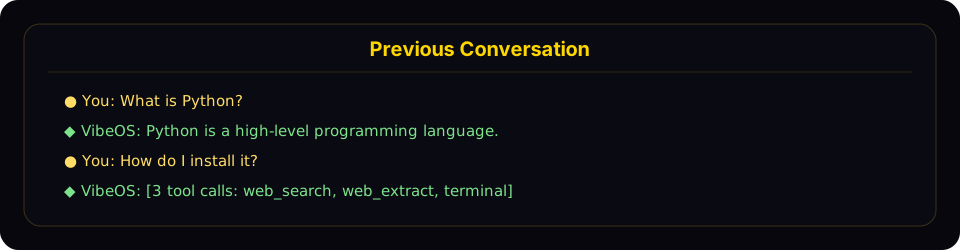
Resume mode shows a compact recap panel with recent user and assistant turns before returning you to the live prompt.
The recap:
- Shows user messages (gold
●) and assistant responses (green◆) - Truncates long messages (300 chars for user, 200 chars / 3 lines for assistant)
- Collapses tool calls to a count with tool names (e.g.,
[3 tool calls: terminal, web_search]) - Hides system messages, tool results, and internal reasoning
- Caps at the last 10 exchanges with a "... N earlier messages ..." indicator
- Uses dim styling to distinguish from the active conversation
To disable the recap and keep the minimal one-liner behavior, set in ~/.vibeos/config.yaml:
display:
  resume_display: minimal   # default: full
Session IDs follow the format YYYYMMDD_HHMMSS_<hex> — CLI/TUI sessions use a 6-char hex suffix (e.g. 20250305_091523_a1b2c3), gateway sessions use an 8-char suffix (e.g. 20250305_091523_a1b2c3d4). You can resume by ID (full or unique prefix) or by title — both work with -c and -r.
Cross-Platform Handoff
Use /handoff <platform> from a CLI session to transfer the live conversation to a messaging platform's home channel. The agent picks up exactly where the CLI left off — same session id, full role-aware transcript, tool calls and all.
# Inside a CLI session
/handoff telegram
What happens:
-
The CLI validates that
<platform>is enabled and has a home channel set (run/sethomefrom the destination chat once to configure it). -
The CLI marks the session pending and block-polls the gateway. It refuses if the agent is mid-turn — wait for the current response to finish first.
-
The gateway watcher claims the handoff and asks the destination adapter for a fresh thread:
- Telegram — opens a new forum topic (DM topics if Bot API 9.4+ Topics mode is enabled in the chat, or a forum supergroup topic).
- Discord — creates a 1440-min auto-archive thread under the home text channel.
- Slack — posts a seed message and uses its
tsas the thread anchor. - WhatsApp / Signal / Matrix / SMS — no native threads, falls back to the home channel directly.
-
The gateway re-binds the destination key to your existing CLI session id, then forges a synthetic user turn asking the agent to confirm and summarize. The reply lands in the new thread.
-
When the gateway acknowledges success, the CLI prints a
/resumehint and exits cleanly:↻ Handoff complete. The session is now active on telegram.
Resume it on this CLI later with: /resume my-session-title -
From that point, the conversation lives on the platform. Reply in the new thread — anyone authorized in that channel shares the same session, and any later real user message in the thread joins seamlessly because thread sessions key without
user_id.
Resume back to CLI: when you want to come back to a desktop, just run /resume <title> (or vibeos -r "<title>" from the shell) and pick up where the platform left off.
Failure modes:
- No home channel configured → CLI refuses with a
/sethomehint. - Platform not enabled / gateway not running → CLI times out at 60s with a clear message and your CLI session stays intact.
- Thread creation fails (permissions, topics-mode off) → falls back to the home channel directly and still completes; no thread isolation but the handoff itself works.
adapter.sendfails (rate limit, transient API error) → handoff marked failed with the reason; the row clears so you can retry.
Limitation worth knowing: for non-thread-capable platforms with multi-user group home channels, the synthetic turn keys as a DM-style session. This works for self-DM home channels (the typical setup) but isn't ideal for genuinely shared group chats. Threading covers Telegram / Discord / Slack — by far the common case — so most setups never hit this.
Session Naming
Give sessions human-readable titles so you can find and resume them easily.
Auto-Generated Titles
VibeOS automatically generates a short descriptive title (3–7 words) for each session after the first exchange. This runs in a background thread using a fast auxiliary model, so it adds no latency. You'll see auto-generated titles when browsing sessions with vibeos sessions list or vibeos sessions browse.
Auto-titling only fires once per session and is skipped if you've already set a title manually.
Setting a Title Manually
Use the /title slash command inside any chat session (CLI or gateway):
/title my research project
The title is applied immediately. If the session hasn't been created in the database yet (e.g., you run /title before sending your first message), it's queued and applied once the session starts.
You can also rename existing sessions from the command line:
vibeos sessions rename 20250305_091523_a1b2c3d4 "refactoring auth module"
Title Rules
- Unique — no two sessions can share the same title
- Max 100 characters — keeps listing output clean
- Sanitized — control characters, zero-width chars, and RTL overrides are stripped automatically
- Normal Unicode is fine — emoji, CJK, accented characters all work
Compression and Continuations
When a session gets long, use /compress. Compression reduces the active
context inside the same conversation, so the current chat, title, goal, Desktop
route, and messaging thread stay in place.
Older VibeOS versions and explicit continuation workflows can still produce lineage variants. For example, if you deliberately create a continuation from a prepared context handoff, titles may be numbered:
"my project" → "my project #2" → "my project #3"
When you resume by name (vibeos -c "my project"), VibeOS still understands
those historical lineage variants and picks the most recent matching session.
/branch is different from compression: it deliberately creates a child
session with a copied transcript. The child retains its parent's persisted
working directory and confirmed project binding, so its normal memory recall
stays within the same project without guessing from the text of a request.
/title in Messaging Platforms
The /title command works in all gateway platforms (Telegram, Discord, Slack, WhatsApp):
/title My Research— set the session title/title— show the current title
Session Management Commands
VibeOS provides a full set of session management commands via vibeos sessions:
List Sessions
# List recent sessions (default: last 20)
vibeos sessions list

# Filter by platform
vibeos sessions list --source telegram

# Show more sessions
vibeos sessions list --limit 50
When sessions have titles, the output shows titles, previews, and relative timestamps:
Title                  Preview                                  Last Active   ID
────────────────────────────────────────────────────────────────────────────────────────────────
refactoring auth       Help me refactor the auth module please   2h ago        20250305_091523_a
my project #3          Can you check the test failures?          yesterday     20250304_143022_e
—                      What's the weather in Las Vegas?          3d ago        20250303_101500_f
When no sessions have titles, a simpler format is used:
Preview                                            Last Active   Src    ID
──────────────────────────────────────────────────────────────────────────────────────
Help me refactor the auth module please             2h ago        cli    20250305_091523_a
What's the weather in Las Vegas?                    3d ago        tele   20250303_101500_f
Export Sessions
# Export all sessions to a JSONL file
vibeos sessions export backup.jsonl

# Export sessions from a specific platform
vibeos sessions export telegram-history.jsonl --source telegram

# Export a single session
vibeos sessions export session.jsonl --session-id 20250305_091523_a1b2c3d4
Exported files contain one JSON object per line with full session metadata and all messages.
Delete a Session
# Delete a specific session (with confirmation)
vibeos sessions delete 20250305_091523_a1b2c3d4

# Delete without confirmation
vibeos sessions delete 20250305_091523_a1b2c3d4 --yes
Rename a Session
# Set or change a session's title
vibeos sessions rename 20250305_091523_a1b2c3d4 "debugging auth flow"

# Multi-word titles don't need quotes in the CLI
vibeos sessions rename 20250305_091523_a1b2c3d4 debugging auth flow
If the title is already in use by another session, an error is shown.
Prune Old Sessions
# Delete ended sessions older than 90 days (default)
vibeos sessions prune

# Custom age threshold
vibeos sessions prune --older-than 30

# Only prune sessions from a specific platform
vibeos sessions prune --source telegram --older-than 60

# Skip confirmation
vibeos sessions prune --older-than 30 --yes
Pruning only deletes ended, non-archived sessions (sessions that have been explicitly ended or auto-reset). Active sessions and sessions you archived are never pruned; delete an archived session explicitly when you no longer need it.
Session Statistics
vibeos sessions stats
Output:
Total sessions: 142
Total messages: 3847
  cli: 89 sessions
  telegram: 38 sessions
  discord: 15 sessions
Database size: 12.4 MB
For deeper analytics — token usage, cost estimates, tool breakdown, and activity patterns — use vibeos insights.
Session Search Tool
The agent has a built-in session_search tool that performs full-text search over past conversations using SQLite's FTS5 engine — and lets the agent scroll through any session it finds. When the active session has a confirmed project, discovery and browse stay inside that project by default; unbound sessions search the profile. When you explicitly name another project, ask to compare projects, or the local result cannot contain the requested history, the agent can use scope="all" itself rather than asking you to repeat the scope. In a messaging gateway, both scopes are also limited to the requesting user's sessions. No LLM calls, no summarization, no truncation. Every shape returns actual messages from the DB.
Three calling shapes
The tool infers what you want from which arguments you set. There's no mode parameter.
1. Discovery — pass query:
session_search(query="auth refactor", limit=3)
Runs FTS5, dedupes hits by session lineage, returns the top N sessions. Each result carries:
session_id,title,when,sourcesnippet— FTS5-highlighted match excerptbookend_start— first 3 user+assistant messages of the session (the goal/kickoff)messages— ±5 messages around the FTS5 match, with the anchor message flagged (the hit in context)bookend_end— last 3 user+assistant messages of the session (the resolution/decisions)match_message_id,messages_before,messages_after
Bookends + window together reconstruct goal → match → resolution without paying for the whole transcript. Typical wall time: 15–50ms on a real session DB.
2. Scroll — pass session_id + around_message_id:
session_search(session_id="20260510_174648_805cc2", around_message_id=590803, window=10)
Returns a window of ±window messages centered on the anchor. No FTS5, no bookends — just the slice. Use after a discovery call when you need more context than the ±5 default window.
- To scroll forward: pass
messages[-1].idback asaround_message_id - To scroll backward: pass
messages[0].idback asaround_message_id - The boundary message appears in both windows as an orientation marker
- When
messages_beforeormessages_afteris less thanwindow, you're at the start or end of the session
Typical wall time: 1–2ms per scroll call.
3. Browse — no args:
session_search()
Returns recent sessions chronologically (titles, previews, timestamps). Useful when the user asks "what was I working on" without naming a topic.
To search the entire profile rather than the active project:
session_search(query="auth refactor", scope="all")
FTS5 query syntax
The keyword mode supports standard FTS5 query syntax:
- Simple keywords:
docker deployment(FTS5 defaults to AND) - Phrases:
"exact phrase" - Boolean:
docker OR kubernetes,python NOT java - Prefix:
deploy*
Optional parameters
sort—newestoroldest, on top of FTS5 ranking. Omit for relevance-only ordering (the default; suitable for exploratory recall). Usenewestfor "where did we leave X" questions,oldestfor "how did X start" questions.role_filter— comma-separated roles to include. Discovery defaults touser,assistant(tool output is usually noise). Passuser,assistant,toolto include tool output (debugging tool behaviour) ortoolto search tool output only.scope—project(default) searches the active confirmed project;alldeliberately searches the full profile. In a messaging gateway, “full profile” still means only the requesting user's sessions. Results report both the effectivescopeandscope_requested, so an unbound session is visible as profile-wide rather than silently appearing project-scoped.
When It's Used
The agent is prompted to use session search automatically:
"When the user references something from a past conversation or you suspect relevant prior context exists, use session_search to recall it before asking them to repeat themselves."
Typical triggers: "we did this before", "remember when", "last time", "as I mentioned", or any reference to a project/person/concept that isn't in the current window.
Per-Platform Session Tracking
Gateway Sessions
On messaging platforms, sessions are keyed by a deterministic session key built from the message source:
| Chat Type | Default Key Format | Behavior |
|---|---|---|
| Telegram DM | agent:main:telegram:dm:<chat_id> | One session per DM chat |
| Discord DM | agent:main:discord:dm:<chat_id> | One session per DM chat |
| WhatsApp DM | agent:main:whatsapp:dm:<canonical_identifier> | One session per DM user (LID/phone aliases collapse to one identity when mapping exists) |
| Group chat | agent:main:<platform>:group:<chat_id>:<user_id> | Per-user inside the group when the platform exposes a user ID |
| Group thread/topic | agent:main:<platform>:group:<chat_id>:<thread_id> | Shared session for all thread participants (default). Per-user with thread_sessions_per_user: true. |
| Channel | agent:main:<platform>:channel:<chat_id>:<user_id> | Per-user inside the channel when the platform exposes a user ID |
When VibeOS cannot get a participant identifier for a shared chat, it falls back to one shared session for that room.
Shared vs Isolated Group Sessions
By default, VibeOS uses group_sessions_per_user: true in config.yaml. That means:
- Alice and Bob can both talk to VibeOS in the same Discord channel without sharing transcript history
- one user's long tool-heavy task does not pollute another user's context window
- interrupt handling also stays per-user because the running-agent key matches the isolated session key
If you want one shared "room brain" instead, set:
group_sessions_per_user: false
That reverts groups/channels to a single shared session per room, which preserves shared conversational context but also shares token costs, interrupt state, and context growth.
Shared vs Isolated Thread Sessions
Forum topics, Discord threads, and Slack threads default to a shared session for every participant (thread_sessions_per_user: false). That is intentional: a thread is usually one collaborative conversation.
If multiple people in the same thread each need a private agent lane (separate history, interrupts, and token budget), opt in:
thread_sessions_per_user: true
Compare with group_sessions_per_user (above), which controls non-thread group/channel isolation and defaults to true (per-user). Neither setting changes terminal.cwd — working directory is still process-wide for the gateway.
Session Reset Policies
Gateway sessions are automatically reset based on configurable policies:
- idle — reset after N minutes of inactivity
- daily — reset at a specific hour each day
- both — reset on whichever comes first (idle or daily)
- none — never auto-reset
Before a session is auto-reset, the agent is given a turn to save any important memories or skills from the conversation.
Sessions with active background processes are never auto-reset, regardless of policy.
Storage Locations
| What | Path | Description |
|---|---|---|
| SQLite database | ~/.vibeos/state.db | All session metadata + messages with FTS5 |
| Gateway messages | ~/.vibeos/state.db | SQLite — canonical store for all session messages |
| Gateway routing index | ~/.vibeos/sessions/sessions.json | Maps session keys to active session IDs (origin metadata, expiry flags) |
The SQLite database uses WAL mode for concurrent readers and a single writer, which suits the gateway's multi-platform architecture well.
sessions.json is not the session list~/.vibeos/sessions/sessions.json is the gateway routing index — it maps
messaging session keys (agent:main:<platform>:...) to active session IDs.
It only ever contains gateway/messaging entries, so if you run a messaging
platform you'll see only those (e.g. agent:main:whatsapp:dm:...).
This is expected and does not mean your CLI sessions are missing.
vibeos sessions list, /sessions, and the dashboard all read state.db,
which holds every session (CLI, TUI, and gateway). The /save snapshots
under ~/.vibeos/sessions/saved/*.json are convenience exports, not the index.
If CLI sessions genuinely don't appear in vibeos sessions list, the cause is
state.db not receiving them — run vibeos sessions repair and watch for a
⚠ Session store unavailable warning at CLI startup, which means SQLite
persistence failed for that run.
Sessions created before state.db became canonical may have leftover
*.jsonl files in ~/.vibeos/sessions/. They are no longer written or
read by VibeOS. Safe to delete after verifying the corresponding session
exists in state.db.
Database Schema
Key tables in state.db:
- sessions — session metadata (id, source, user_id, model, title, timestamps, token counts). Titles have a unique index (NULL titles allowed, only non-NULL must be unique).
- messages — full message history (role, content, tool_calls, tool_name, token_count)
- messages_fts — FTS5 virtual table for full-text search across message content
Session Expiry and Cleanup
Automatic Cleanup
- Gateway sessions auto-reset based on the configured reset policy
- Before reset, the agent saves memories and skills from the expiring session
- Opt-in auto-pruning: when
sessions.auto_pruneistrue, ended, non-archived sessions older thansessions.retention_days(default 90) are pruned at CLI/gateway startup - After a prune that actually removed rows,
state.dbisVACUUMed to reclaim disk space (SQLite does not shrink the file on plain DELETE) - Pruning runs at most once per
sessions.min_interval_hours(default 24); the last-run timestamp is tracked insidestate.dbitself so it's shared across every VibeOS process in the sameVIBEOS_HOME
Default is off — session history is valuable for session_search recall, and silently deleting it could surprise users. Enable in ~/.vibeos/config.yaml:
sessions:
  auto_prune: true          # opt in — default is false
  retention_days: 90        # keep ended sessions this many days
  vacuum_after_prune: true  # reclaim disk space after a pruning sweep
  min_interval_hours: 24    # don't re-run the sweep more often than this
Active and archived sessions are never auto-pruned, regardless of age.
Manual Cleanup
# Prune sessions older than 90 days
vibeos sessions prune

# Delete a specific session
vibeos sessions delete <session_id>

# Export before pruning (backup)
vibeos sessions export backup.jsonl
vibeos sessions prune --older-than 30 --yes
The database grows slowly (typical: 10-15 MB for hundreds of sessions) and session history powers session_search recall across past conversations, so auto-prune ships disabled. Enable it if you're running a heavy gateway/cron workload where state.db is meaningfully affecting performance (observed failure mode: 384 MB state.db with ~1000 sessions slowing down FTS5 inserts and /resume listing). Use vibeos sessions prune for one-off cleanup without turning on the automatic sweep.